
一、下载地址
https://rocketmq.apache.org/download
二、安装
1.解压
unzip rocketmq-all-5.2.0-bin-release.zip
2.修改conf目录配置文件
vi broker.conf
#所属集群名字
brokerClusterName=DefaultCluster
#broker名字,注意此处不同的配置文件填写的不一样,如果在broker-a.properties使用:broker-a,
#在broker-b.properties使用:broker-b
brokerName=broker-a
#0 表示Master,>0 表示Slave
brokerId=0
#nameServer地址,分号分割
#namesrvAddr=rocketmq-nameserver1:9876;rocketmq-nameserver2:9876
namesrvAddr=172.16.32.12:9876
#启动IP,如果 docker 报 com.alibaba.rocketmq.remoting.exception.RemotingConnectException: connect to <192.168.0.120:10909> failed
# 解决方式1 加上一句producer.setVipChannelEnabled(false);,解决方式2 brokerIP1 设置宿主机IP,不要使用docker 内部IP
brokerIP1=172.16.32.12
#在发送消息时,自动创建服务器不存在的topic,默认创建的队列数
defaultTopicQueueNums=4
#是否允许 Broker 自动创建Topic,建议线下开启,线上关闭 !!!这里仔细看是false,false,false
#原因下篇博客见~ 哈哈哈哈
autoCreateTopicEnable=false
#是否允许 Broker 自动创建订阅组,建议线下开启,线上关闭
autoCreateSubscriptionGroup=false
#Broker 对外服务的监听端口
listenPort=10911
#删除文件时间点,默认凌晨4点
deleteWhen=04
#文件保留时间,默认48小时
fileReservedTime=120
#commitLog每个文件的大小默认1G
mapedFileSizeCommitLog=1073741824
#ConsumeQueue每个文件默认存30W条,根据业务情况调整
mapedFileSizeConsumeQueue=300000
#destroyMapedFileIntervalForcibly=120000
#redeleteHangedFileInterval=120000
#检测物理文件磁盘空间
diskMaxUsedSpaceRatio=88
#存储路径
#storePathRootDir=/home/xwhe/rocketmq/store
#commitLog 存储路径
#storePathCommitLog=/home/xwhe/rocketmq/store/commitlog
#消费队列存储
#storePathConsumeQueue=/home/xwhe/rocketmq/store/consumequeue
#消息索引存储路径
#storePathIndex=/home/xwhe/rocketmq/store/index
#checkpoint 文件存储路径
#storeCheckpoint=/home/xwhe/rocketmq/store/checkpoint
#abort 文件存储路径
#abortFile=/home/xwhe/rocketmq/store/abort
#限制的消息大小
maxMessageSize=65536
#flushCommitLogLeastPages=4
#flushConsumeQueueLeastPages=2
#flushCommitLogThoroughInterval=10000
#flushConsumeQueueThoroughInterval=60000
#Broker 的角色
#- ASYNC_MASTER 异步复制Master
#- SYNC_MASTER 同步双写Master
#- SLAVE
brokerRole=ASYNC_MASTER
#刷盘方式
#- ASYNC_FLUSH 异步刷盘
#- SYNC_FLUSH 同步刷盘
flushDiskType=ASYNC_FLUSH
#发消息线程池数量
#sendMessageThreadPoolNums=128
#拉消息线程池数量
#pullMessageThreadPoolNums=128
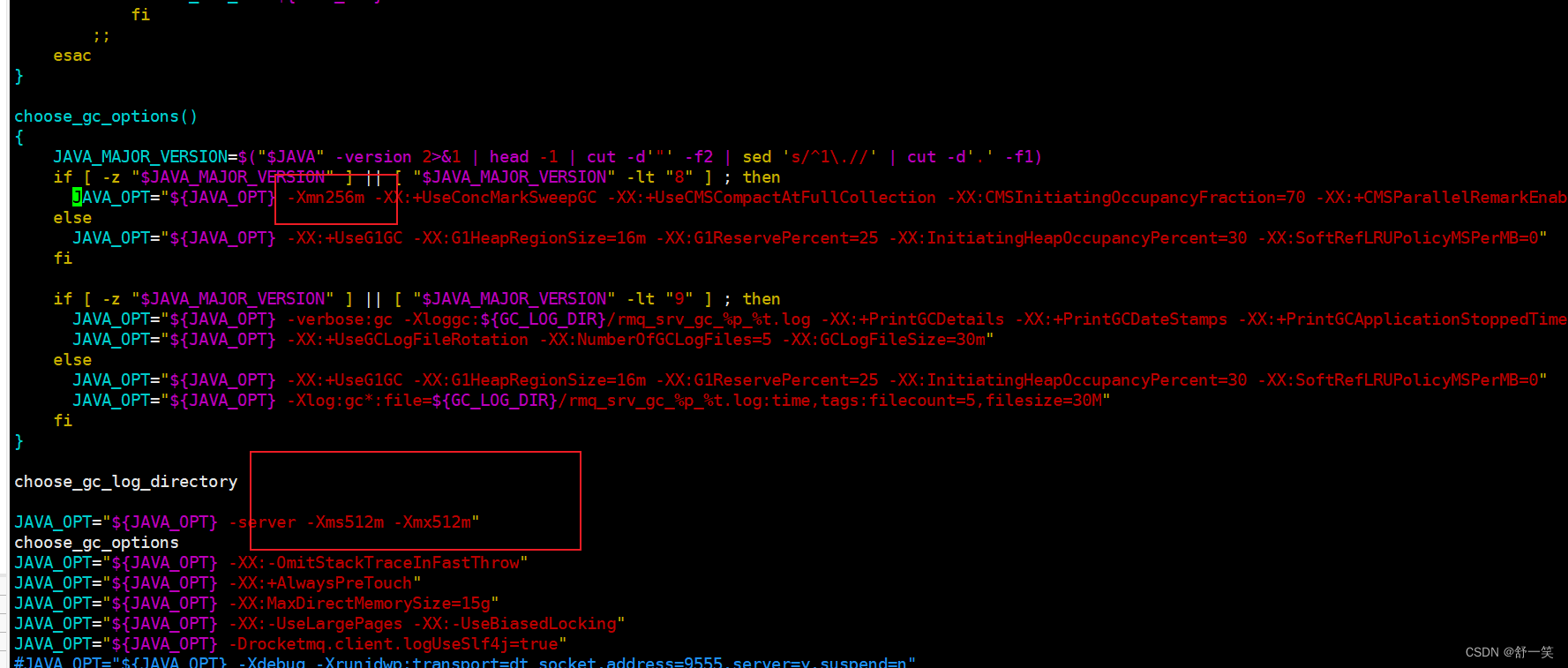
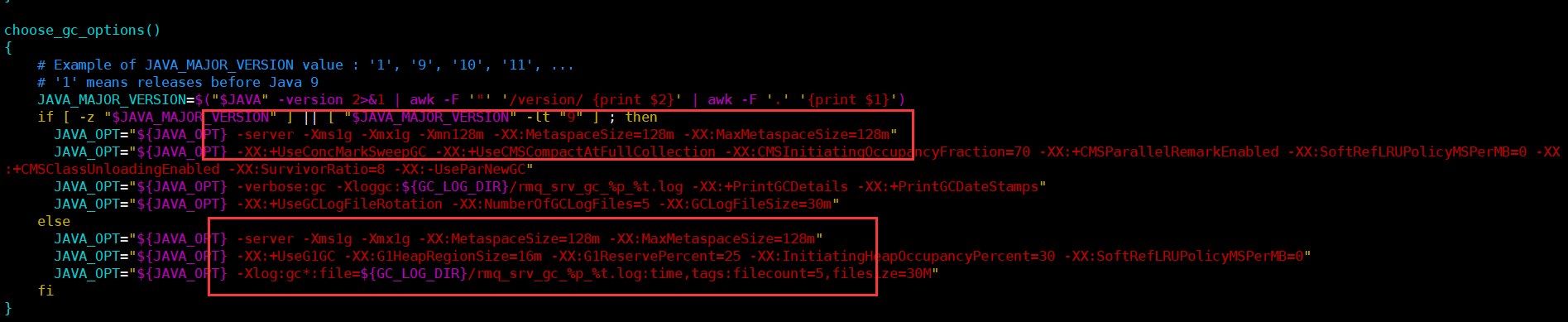
3.修改bin目录配置文件
vi runbroker.sh
vi runserver.sh
4.启动
nohup sh mqnamesrv &
nohup sh mqbroker -n localhost:9876 &
5.操作主题
./mqadmin topicList -n localhost:9876
./mqadmin updatetopic -n localhost:9876 -c DefaultCluster -t TestTopic -a +message.type=NORMAL
./mqadmin deleteTopic -n localhost:9876 -c DefaultCluster -t TestTopic
6.日志
cat logs/rocketmqlogs/namesrv.log